This is part 1 - Why and how to get a server, Part 2: Install the server, Part 3: Tests, Part 4: setup and migrate
Disclaimer : All opinions, ideas and choices described thereafter are stricly my own.
Motivation
Garaia, the company I previously founded, was running a cluster of 4 servers spread out on 2 French providers (OVH and Online.net). The 2 main servers were in charge of running the show while the 2 other ones served as hot backups in case OVH broke down... And for those who missed it, oh boy it did !.
Since then, I joined my dream company and became Commercial Lead at Canonical . As such, not only did I join a company that promotes multi and hybrid clouds, but a part of my job is also to prove the better economical and performance dominance of private clouds over public clouds.
So it seemed a bit hypocritical on my part to keep most of my stacks on public clouds. Moreover, since I am now in charge of procuring servers for our infrastructure, I thought I might acquire one of those for myself and have fun with it ! Well, most probably one of the great grand fathers of the kind we get at Canonical, but still ;-D ).
Finally, I wanted to see if you could compete with public cloud prices even with modest/commodity hardware, as Canonical and its clients already do with larger infrastructures.
So, here's the plan:
- get a cheap server on ebay,
- set it up in my home,
- migrate all my services on it and get rid of the two pieces it will replace, namely the last living bare metal I rent, and my home NAS.
 |
|---|
| That remains to be seen :'-) |
0. Current situation
Before going on our first phase of the plan (a.k.a.: "buying, shopping, spending"), let's get a feel of what is there and how it is used. This will provide guidelines and orientations on the specs we are looking for.
Online.net
Server specs
This server is a rather modest : an energy efficient Intel Atom CPU C2750, with 16 GiB of RAM and 1 TB of HDD.
In short, a single low end core, few RAM, no SSD, no RAID : more "bare minimum" than "bare metal"
# lscpu extract

CPU(s):                          8
Thread(s) per core:              1
Core(s) per socket:              8
Socket(s):                       1
Model name:                      Intel(R) Atom(TM) CPU  C2750  @ 2.40GHz
CPU MHz:                         1300.053
CPU max MHz:                     2401.0000
CPU min MHz:                     1200.0000

# lsmem extract
Memory block size:       128M
Total online memory:      16G
Total offline memory:      0B

# fdisk extract
Disk /dev/sda: 931.51 GiB, 1000204886016 bytes, 1953525168 sectors
Usage
This server is running around 30 LXD and Docker containers:
- Garaia's main server and sattelites
- Garaia related services (Minio, some RDBs and caches, Gitea, ...)
- Support/infra services (SSh access, borg backups, VPN)
- Docker related services (registry, registry browser, portainer, ...)
- Some user related services (Syncthing, Vaultwarden, ...)
- Test/tryout machines and services
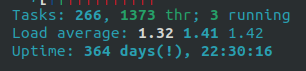
All in all, this server is rather under-used at 8% CPU usage and under 3 GiB of RAM needed.

Running costs
I rent this machine for 32 € / month.
Home NAS
Specs
Qnap TS 451+ :
- Intel® Celeron® J1900 4-core/4-thread at 2.0GHz (turbo: 2.42 GHz),
- 8 GiB RAM,
- 4x2To disks set in a RAID5 array.
This NAS is already 7 years old and has proven reliable. I already have had to change failing disks which was a satisfying experience. I really enjoy the 3 disks + 1 parity setup, nice balance between disk loss and security.
Usage

Here is the obeserved usage of this NAS :
- 5 - 10 containers (Docker + LXD)
- 15% CPU
- 4GiB Ram (~50%)
- 700-800 GiB storage (12-15% total storage)
Running costs
Power consumptions benchmarks are easy to find over the web for the TS 451+.
Taking into account my average usage, I recon my TS 451+ consumption to average 30W which would amount to 40€ / year in electricity.
Since the NAS is now old, its acquisition cost is out of the scope, but its safe to say that I'll need to replace one of its disk every 18 months. The last disk I bought was 60€ so 40€/year.
The monthly cost of this NAS thus amounts to 6.67€/month
Conclusions
For running all my services, the two machines consume around :
- under 2 x 2GHz cores full time (the cpu cores of my two machines are similar enough to be aggregated)
- less than 8 GiB of RAM
- around 850 GiB of disk space
In terms of monthly costs we're set at around 39 € / month
Ebay browsing
I went for the "best bang for your buck ®" strategy there, even more so, "What's the dirt-cheapest server I can find that will have the specs necessary to replace my stack ®".
Being a great fan of Stéphane Graber's videos, where he once showcased his 3 servers cluster bought on ebay for "250-300$" each, I decided to take that that as my price base.
And indeed, there are lots of servers to buy from ebay for 250$. The data center industry is pushed to acquire every new generation of servers as they generally present real advantages on the performance or TCO front. 2 generations later you have myriads of servers that no one is interested in getting, safe for the personal hobyists as myself.
But even those servers are far too powerful for my needs and being determined to go the miser way, I eventually found this beauty :
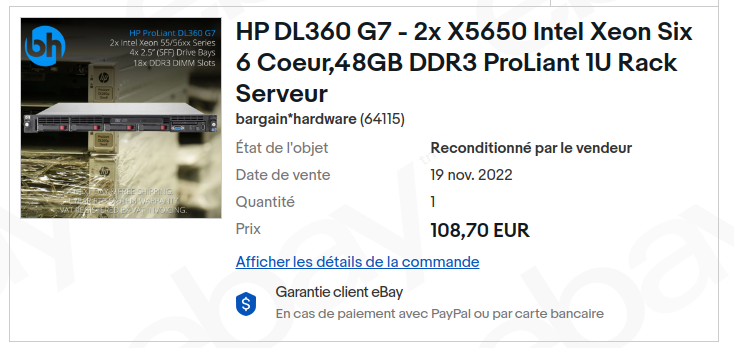
Yep, a hundred bucks, 130 € with shipping : half the price I was set on. It's far over specd compared to the existing hardware I own and this is HPE, the reference brand, commonly used at Canonical. This looks like a great candidate !
Now, let's get some disks. So, it's worth mentioning that server manufacturers are apparently not the best in class when it comes to open standards, interoperability, support and maintaining legacy hardware. HPE, as you'll read Part 2: Install the server is even pretty bad on that front. Unsupported hardware, unmaintained software.
For instance, I read that HPE is only supporting their own brand of hard disks (not the cheapest one obviously). Some hardware may work fine, but some disks might have the effect of having the fans running full speed continuously. Luckily I stumbled upon this offer
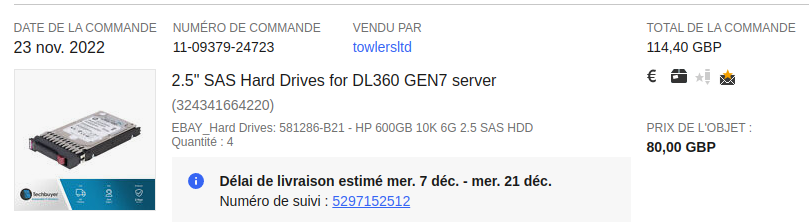
4 HDD certified for my server for a total of 115 € with shipping. They are second hand HDD. But they are sold as "working". I'll run some tests on those to check their real mileage.
This config is promising as it looks like it fits both my needs and budget.
Specs comparison
The config I am running for is clearly an overkill in terms of CPU :
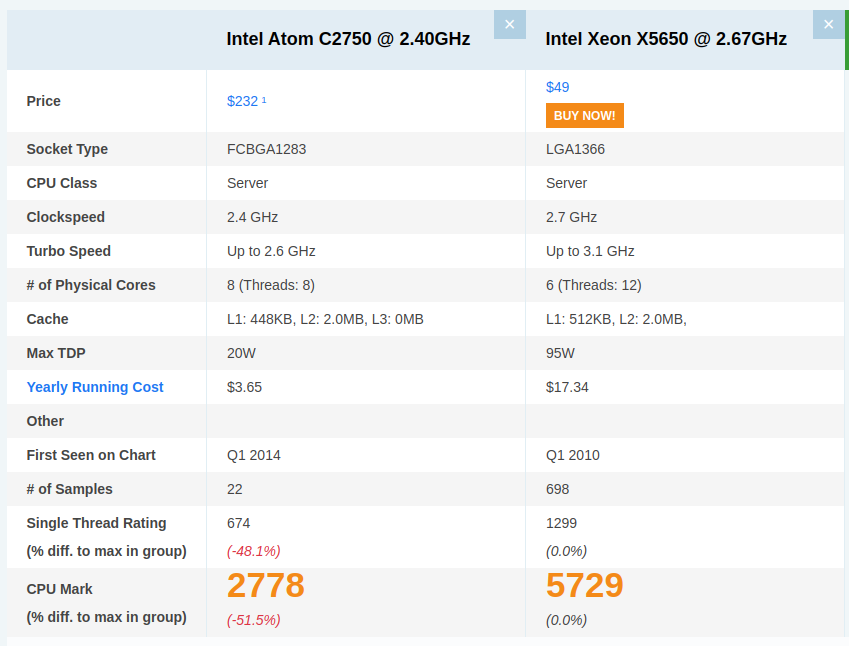
This config will provide:
- 24 vcores (when I normally use about 2 of them)
- Twice the computing power, each core being twice as powerful as the CPUs I am currently running
- 48 GiB of ram when 4 were really needed and 16 was the target
- 1.8TB of disk space (twice my current usage)
- in short tons of overhead to have fun and experiment with
Costs Comparison
Buying costs / CapEx
In total for server, hard disks, and shipping : under than 250€.
I think I could run this setup as is for at least four years, given I replace 1 HDD/year on average (remember those are second hand).
- 250 / 4 = 62.5 € amortization / year
- 130 / 4 = 32.5 € replacement parts / year
Yearly CapEx would amount to 95€/ year or 8€ / month
Running costs / OpEx
As the server will most probably be as idle as the existing setup, I first thought it would consume around 180 to 200W. In fact, grafana shows it rarely goes over 125W.
At the current prices of energy in my area the yearly cost of energy amounts to around 185 € / year or 15 € /month
Costs verdict
I will drop down from 36 € per month to 23 € a discount of around 36 % for 4 times the power and for times the RAM. Not bad.
But this comparison is not really fair since the new stack is more powerful than the previous one. Let's redo it taking the assumption I would get the same ATOM processor and same power consumption. My energy cost would fall to 2,5€/month, my full cost would be of around 11 € /month providing a discount of almost 70% vs Public clouds.